*Bells & Whistles version 5 is now available. See what's new.
Bells & Whistles alerts you to "reply to all addresses", "attach files" or "fill blank email subject"!
Check for missing reply addresses in Outlook
Bells & Whistles can save you from a lot of trouble and unpleasant situations,
by notifying you whenever you are about to reply to an email only to the original sender, without copying the other addresses where the email was initially sent.
To enable the reply to all monitor, open the Bells & Whistles configuration window (from
the Outlook Tools menu) and you will see a section called "Alerts & Notes". You can choose
to enable the "Reply to All" Monitor from here.
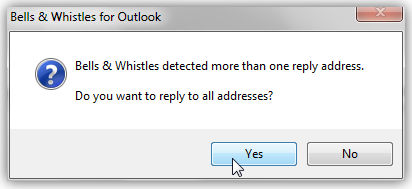
Let's say John sends you an email and he also sends a CC copy to Martin and Fred. When you reply to his email, if you will use the regular Outlook Reply button, the email will be sent only to John. However, Bells & Whistles for Outlook will warn you that there are two other addresses which you may want to include in your reply. If you click Yes on the warning message, Bells & Whistles will automatically alter your email so you will reply to all addresses.
|



|
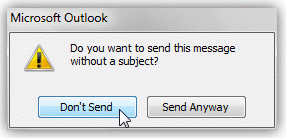
Outlook missing attachment and blank subject alerts
Bells & Whistles can also alert you with alerts whenever you forget to attach a file or to enter an email subject when composing an email message.
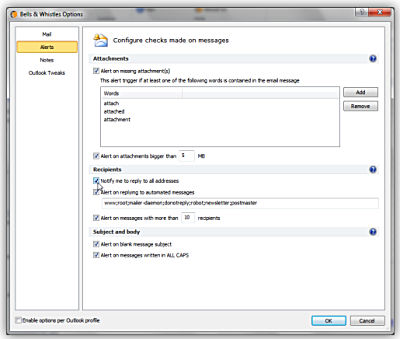
To enable these alerts, open the Bells & Whistles configuration window (from the Outlook Tools menu) and you will see a tab section called "Alerts". You can choose to enable both the subject and the missing attachment alerts or you can enable only one of them.
If the missing attachment alert is enabled, then by clicking on the Settings buton, you can define custom words that will trigger the missing attachment alert. Whenever you want to send a new email, Bells & Whistles will silently scan the email for missing attachment trigger words and, if one of them is found, it will popup the alarm. Bells & Whistles will always look for these words only on the text section that you composed, so it will skip previous replies or forwards.
Bells & Whistles for Outlook: Main Features
Below you can find more information about some of the most important features of the Bells & Whistles add-in for Outlook. You are welcome to download a free evaluation copy of the Outlook add-in, yours to use for 20 days, with no purchase obligation.
Installation and Licensing the Outlook Add-in
Installing Bells & Whistles for Outlook;
Purchasing and registering the Bells & Whistles add-in for Outlook.
Outlook Reply Options & Alerts
Automatically add greetings to Outlook email messages;
Outlook "reply to all" monitor addin;
Automatically specify the Outlook email reply format;
Automatically put people I reply to in Contacts.
Outlook Email Templates
How to create and use the Outlook signature add-in;
How to use email templates on Outlook email messages;
How to use predefined Outlook email templates on Outlook messages.
Outlook Send Email Options
Insert email tracking IDs and count replies in Outlook;
Setting up a different Reply-To Address on Outook emails;
How to resend an Outlook sent email;
How to append date & time stamps to emails;
How to preselect the email account for sending Outlook messages;
Easy BCC mail merge sessions;
Always CC or BCC someone on every email;
How to always archive attachments when attaching files to Outlook emails.
Outlook Email Management Features
How to use email notes on Outlook messages;
Enable Outlook blocked attachments;
How to manage or remove Outlook add-ins.
System Requirements: Microsoft Windows Me, Windows 2000, Windows XP, Windows Vista, Windows 7 / Microsoft Office 2000, 2002 (XP), 2003, 2007, 2010, 2013 / Outlook 2000, 2002 (XP), 2003, 2007, 2010 and 2013 (x32 and x64).
|