*Bells & Whistles version 5 is now available. See what's new.
Manage or remove your Outlook add-ins with the Bells & Whistles Outlook Add-in Utility!
Free Outlook Add-in Utility
Using this Outlook Add-in Manager, you can easily remove Outlook add-ins from your Outlook profile! The Outlook Add-in Utility is a free bonus that is included in the Bells & Whistles
add-ins collection for Outlook.
It can be installed by downloading and doing a complete
installation of Bells & Whistles
for Outlook. Once installed, you can run it from the Bells & Whistles program
group:
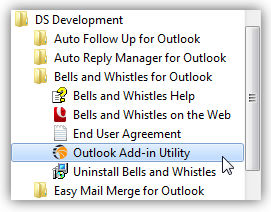
The goal of our Add-in Utility is to give you a user-friendly solution for handling
Outlook Add-ins. Unfortunately, some 3rd party Outlook add-ins simply
don't list themselves on the Outlook COM Add-in section, which means that you
cannot disable them using the standard Outlook interface.
|



|
|
Also, if one of your Outlook Add-ins was causing Outlook to fail while
trying to start, then you would not be able to use the Outlook built-in add-in
manager.
Once loaded, the Outlook Add-in Utility will display a clear
list of all installed Outlook add-ins). This list contains both enabled and disabled
Outlook add-ins. If the Outlook add-in status is "Active", it means the related add-in
is enabled while you use Microsoft Outlook and it should load automatically when you start Outlook. If the status is set to "disabled",
it means the related Outlook add-in is not going to be loaded when Microsoft Outlook
starts.
To enable or disable an Outlook add-in, simply select it from the add-ins list and click on the Enable or Disable button. You will notice that the add-in status will change. To apply this change and add or remove the selected Outlook add-in, you will have to restart Microsoft Outlook.
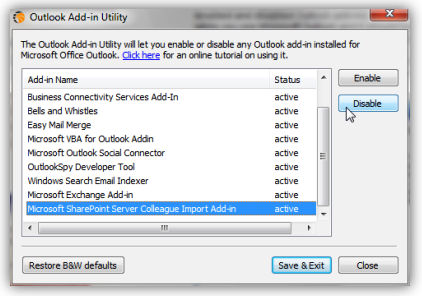
Another function of the Outlook Add-ins tool is to allow you easily reset the settings of the Bells & Whistles Outlook add-in. For example, in case Bells & Whistles triggers Outlook errors, you can quickly restore it to its initial Outlook add-in state.
The Bells & Whistles Add-in for Outlook
Bells & Whistles is practically an Outlook add-in collection, designed to offer you Outlook email productivity and management tools. You can use it to define and insert email text templates, to automatically add reply text to emails such as reply greetings, to add email notes to mailbox messages and many many more.
The Bells & Whistles add-in for Outlook is offered with a 30 days money back guarantee, free service support and one year free upgrades.
more information on the Bells & Whistles Outlook add-in collection.
|