*Bells & Whistles version 5 is now available. See what's new.
Bells & Whistles for Outlook: basic mail merge
How to create BCC mail merge sessions from Outlook
Mail merging from Outlook used to be a pain, forcing you to deal with
Outlook distribution lists, Outlook Contacts and MS-Word.
Bells & Whistles for Outlook makes it very easy, by converting the BCC field
to a mail merge field. As a result, in order to avoid sending emails with multiple
CC, BCC or TO addresses and to quickly generate messages with unique TO fields,
you must enable the Bells & Whistles BCC mail merge option. Outlook will then
fire one email for each address added to the BCC field of a composed message.
To enable this option, open the Bells & Whistles options (from the Outlook Tools
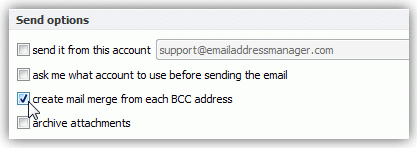
menu), go to the "Send Options" section, make sure the Send Rules are enabled, click on Add and select "create mail merge from each BCC address".
|




|
Bells & Whistles for Outlook: Main Features
Below you can find more information about some of the most important features of the Bells & Whistles add-in for Outlook. You are welcome to download a free evaluation copy of the Outlook add-in, yours to use for 20 days, with no purchase obligation.
Installation and Licensing the Outlook Add-in
Installing Bells & Whistles for Outlook;
Purchasing and registering the Bells & Whistles add-in for Outlook.
Outlook Reply Options & Alerts
Automatically add greetings to Outlook email messages;
Outlook "reply to all" monitor addin;
Automatically specify the Outlook email reply format;
Automatically put people I reply to in Contacts.
Outlook Email Templates
How to create and use the Outlook signature add-in;
How to use email templates on Outlook email messages;
How to use predefined Outlook email templates on Outlook messages.
Outlook Send Email Options
Insert email tracking IDs and count replies in Outlook;
Setting up a different Reply-To Address on Outook emails;
How to resend an Outlook sent email;
How to append date & time stamps to emails;
How to preselect the email account for sending Outlook messages;
Easy BCC mail merge sessions;
Always CC or BCC someone on every email;
How to always archive attachments when attaching files to Outlook emails.
Outlook Email Management Features
How to use email notes on Outlook messages;
Enable Outlook blocked attachments;
How to manage or remove Outlook add-ins.
System Requirements: Microsoft Windows Me, Windows 2000, Windows XP, Windows Vista, Windows 7 / Microsoft Office 2000, 2002 (XP), 2003, 2007, 2010, 2013 / Outlook 2000, 2002 (XP), 2003, 2007, 2010 and 2013 (x32 and x64).
|