*Bells & Whistles version 5 is now available. See what's new.
How to open Outlook blocked file attachments
Outlook unsafe file extensions list
By default, Microsoft Outlook will prevent you from opening certain file attachments that can damage your computer, by containing malware code. However, sometimes you need to be able to handle these attachments (for example Word or Excel files).
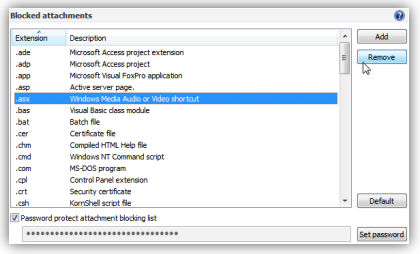
Bells & Whistles offers you the ability to easily decide which file attachments you can trust, by managing the file extensions for the blocked attachments. To customize the attachment blocking list, open the Bells & Whistles window, then go to the "Attachment Blocking" tab:
|



|
For example, if you want to be able to receive and open EXE files, simply select the EXE extension from the attachment extensions list and click on the "Remove" button.
For security reasons, you can password protect this list, so only you can decide which attachments to trust and which to block. To enable the password protection, simply mark the checkbox "Password protect attachment blocking list" then insert your desired password. Next time when you will want to alter the list, you will be asked to input the password firstly.
If a file extensions was added/removed from the list, you will have to restart Outlook for the changes to take effect.
Here is list of attachment file extensions considered unsafe by Outlook.
Bells & Whistles for Outlook: Main Features
Below you can find more information about some of the most important features of the Bells & Whistles add-in for Outlook. You are welcome to download a free evaluation copy of the Outlook add-in, yours to use for 20 days, with no purchase obligation.
Installation and Licensing the Outlook Add-in
Installing Bells & Whistles for Outlook;
Purchasing and registering the Bells & Whistles add-in for Outlook.
Outlook Reply Options & Alerts
Automatically add greetings to Outlook email messages;
Outlook "reply to all" monitor addin;
Automatically specify the Outlook email reply format;
Automatically put people I reply to in Contacts.
Outlook Email Templates
How to create and use the Outlook signature add-in;
How to use email templates on Outlook email messages;
How to use predefined Outlook email templates on Outlook messages.
Outlook Send Email Options
Insert email tracking IDs and count replies in Outlook;
Setting up a different Reply-To Address on Outook emails;
How to resend an Outlook sent email;
How to append date & time stamps to emails;
How to preselect the email account for sending Outlook messages;
Easy BCC mail merge sessions;
Always CC or BCC someone on every email;
How to always archive attachments when attaching files to Outlook emails.
Outlook Email Management Features
How to use email notes on Outlook messages;
Enable Outlook blocked attachments;
How to manage or remove Outlook add-ins.
System Requirements: Microsoft Windows Me, Windows 2000, Windows XP, Windows Vista, Windows 7 / Microsoft Office 2000, 2002 (XP), 2003, 2007, 2010, 2013 / Outlook 2000, 2002 (XP), 2003, 2007, 2010 and 2013 (x32 and x64).
|