*Bells & Whistles version 5 is now available. See what's new.
Over 30 ready to use Outlook email templates!
Bells & Whistles for Outlook: predefined Outlook templates
Version 3 of the Bells & Whistles addin for Outlook comes with more than 30 graphical email templates for Outlook. This way, you can save the money and time that you would spend on finding and purchasing email templates for anniversary, holiday or even business emails. The predefined Outlook templates are grouped in three categories: small, medium and large templates.
All these templates were created by our graphical designers and they are yours to use, as long as you use the trial or licensed version of Bells & Whistles for Outlook. The template themes can be grouped on the following topics, each template being delivered in three sizes, as described above:
Christmas email templates;
Other holidays email templates (Easter, New Year's Ave, etc);
Anniversary email templates;
Valentine's Day email templates;
Halloween email templates;
Business email templates;
Other email templates (funny templates, artistic templates, season templates).
|



|
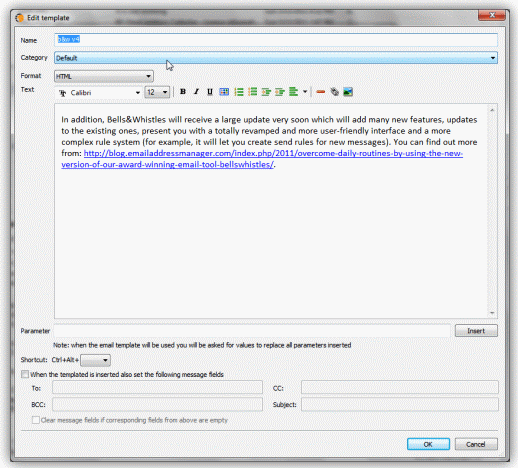
Not only that you can use these Outlook templates, but you can also edit the templates and customize them for your needs. For example, you can attach predefined email subjects or email addresses to each email template, saving you from manually typing the subject line or email recipients every time when you use the Outlook email template. Moreover, you can add predefined text or other HTML elements to be used along the graphical email template.
To insert a template into an email message, simply edit the email as you used to do. While you are using Outlook to compose the email message, you will notice a new toolbar displayed on the Outlook editor window: simply select the desired Outlook template from the toolbar list menu, then click on the Insert button.
Bells & Whistles for Outlook: Main Features
Below you can find more information about some of the most important features of the Bells & Whistles add-in for Outlook. You are welcome to download a free evaluation copy of the Outlook add-in, yours to use for 20 days, with no purchase obligation.
Installation and Licensing the Outlook Add-in
Installing Bells & Whistles for Outlook;
Purchasing and registering the Bells & Whistles add-in for Outlook.
Outlook Reply Options & Alerts
Automatically add greetings to Outlook email messages;
Outlook "reply to all" monitor addin;
Automatically specify the Outlook email reply format;
Automatically put people I reply to in Contacts.
Outlook Email Templates
How to create and use the Outlook signature add-in;
How to use email templates on Outlook email messages;
How to use predefined Outlook email templates on Outlook messages.
Outlook Send Email Options
Insert email tracking IDs and count replies in Outlook;
Setting up a different Reply-To Address on Outook emails;
How to resend an Outlook sent email;
How to append date & time stamps to emails;
How to preselect the email account for sending Outlook messages;
Easy BCC mail merge sessions;
Always CC or BCC someone on every email;
How to always archive attachments when attaching files to Outlook emails.
Outlook Email Management Features
How to use email notes on Outlook messages;
Enable Outlook blocked attachments;
How to manage or remove Outlook add-ins.
System Requirements: Microsoft Windows Me, Windows 2000, Windows XP, Windows Vista, Windows 7 / Microsoft Office 2000, 2002 (XP), 2003, 2007, 2010, 2013 / Outlook 2000, 2002 (XP), 2003, 2007, 2010 and 2013 (x32 and x64).
|